If you own a Jeep Grand Cherokee, having your garage door opener programmed right into your vehicle can make your daily routine smoother and more convenient. Imagine pulling into your driveway and opening your garage door with just a tap of a button inside your Jeep—no fumbling for a remote or stepping out of your car.
Programming your Jeep’s garage door opener might sound tricky, but it’s actually simple when you know the steps. In this guide, you’ll learn exactly how to program your Grand Cherokee’s HomeLink system quickly and easily, so you can enjoy seamless access every time you arrive home.
Ready to take control with just a push of a button? Let’s get started.
Prepare Your Jeep
Before programming your Jeep Grand Cherokee’s garage door opener, get your vehicle ready. Proper preparation ensures smooth and quick programming. This section guides you through essential steps to prepare your Jeep.
Turn Ignition On Without Starting
Start by sitting in the driver’s seat. Insert the key into the ignition switch. Turn the key to the “On” position, but do not start the engine. This powers the vehicle’s electrical system and the HomeLink buttons. The ignition must remain on for programming to work properly.
Locate Homelink Buttons
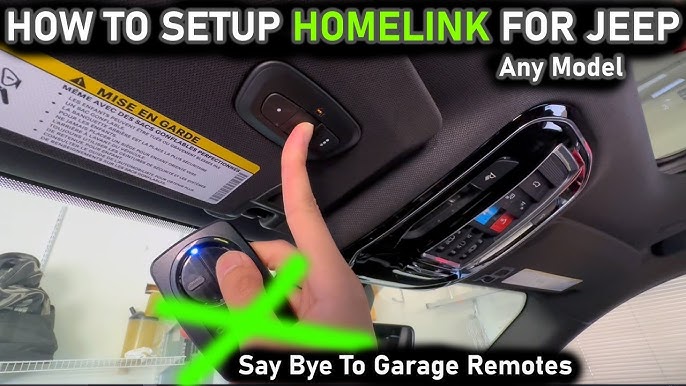
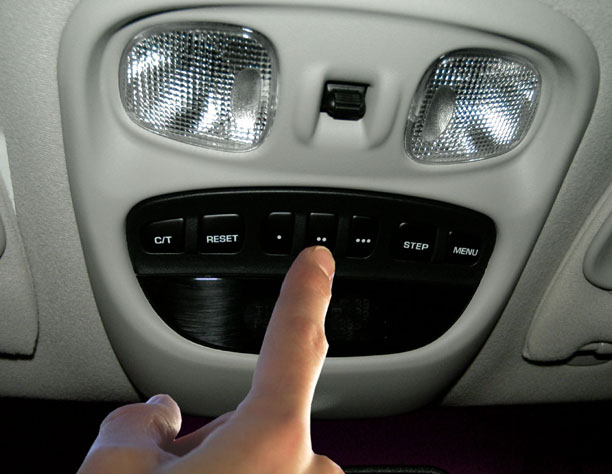
Find the HomeLink buttons inside your Jeep. They are usually located on the rearview mirror, overhead console, or sun visor. These buttons control your garage door opener. Identify the three small buttons labeled with symbols or numbers. These are your HomeLink controls.
Clear Previous Settings
Before programming your Jeep Grand Cherokee’s garage door opener, clearing previous settings is essential. This step ensures old codes do not interfere with new ones. Removing past settings creates a fresh start for smooth programming. Follow these simple steps to clear all previous configurations from your system.
Erase Old Codes
Start by turning your vehicle’s ignition to the “on” position. Press and hold the two outer HomeLink buttons simultaneously. Keep holding them for about 20 seconds. Watch for the indicator light to blink rapidly. This signals that all old codes have been erased. Release the buttons once the light flashes fast. Your system is now ready for new programming.
Reset Homelink System
Resetting the HomeLink system clears stored signals and resets the device. Press and hold the two outer buttons on the HomeLink panel. Hold them until the indicator light blinks slowly and then changes to a rapid blink. This process may take 10 to 30 seconds. After the quick blink, release the buttons immediately. The HomeLink system is now reset and cleared of previous commands.
Program Homelink Button
Programming the HomeLink button in your Jeep Grand Cherokee lets you control your garage door easily. The HomeLink system replaces your handheld remote. You can open or close your garage door with a button inside your vehicle. This guide walks you through programming the HomeLink button step-by-step. It’s simple and quick.
Press And Hold Buttons
Start by turning your Jeep’s ignition to the “On” position. Choose the HomeLink button you want to program. Press and hold this button and your garage door remote button at the same time. Keep holding both buttons. This step allows the HomeLink to learn the signal from your remote. Hold until the indicator light starts blinking.
Watch For Indicator Light
Pay attention to the HomeLink indicator light above the buttons. At first, it will blink slowly. Continue holding the buttons. When the light blinks rapidly, programming is successful. Release both buttons immediately. The fast blinking means the system has saved your garage door’s code. Test the HomeLink button by pressing it to open or close your garage door.
Pair With Garage Door Opener
Pairing your Jeep Grand Cherokee with your garage door opener is a simple process. It allows you to open and close your garage door using buttons inside your vehicle. This section guides you through the key steps for a smooth connection.
Identify Opener Type
Start by checking the brand and model of your garage door opener. Look for a “Learn” or “Smart” button on the motor unit. This button is usually near the antenna wire or light cover. Knowing your opener type helps you follow the right programming steps.
Press Garage Motor Learn Button
Press the “Learn” button on your garage door motor. This button activates the programming mode. You will have about 30 seconds to complete the next step. The motor light may start blinking to show it is ready to pair.
Complete Rolling Code Sync
Inside your Jeep, press and hold the HomeLink button you want to program. Hold it until the garage door motor light blinks or the door moves. This syncs the rolling code between the car and opener. Test the button to ensure it works properly.
Test The Programming
After programming your Jeep Grand Cherokee’s garage door opener, testing the setup is crucial. Confirming it works ensures safe and smooth operation every time. This step lets you see if the vehicle communicates correctly with your garage door system.
Testing the programming helps avoid frustration later. It also saves time by fixing small issues early. Follow the steps below to check your new setup.
Use Homelink Button To Open Door
Start by sitting inside your Jeep. Turn the ignition on, but do not start the engine. Press the HomeLink button you programmed. Hold it for a few seconds.
The garage door should begin to move. If it opens or closes, the programming is successful. You can try pressing the button again to stop the door. This confirms the system responds properly.
Use the HomeLink button in different positions to ensure it works every time. Do not rush through the test. Be patient and observe the door’s reaction.
Troubleshoot Common Issues
If the garage door does not respond, start troubleshooting. Check if the HomeLink indicator light flashes. No light or a slow flash means the button did not program correctly.
Try reprogramming the button. Make sure your garage door remote has fresh batteries. Keep the remote close to the HomeLink system during programming.
Also, check if your garage door opener has a “learn” or “smart” button. Press it briefly before programming again. This resets the connection and allows new devices to pair.
If problems continue, consult your Jeep’s manual or visit a dealer for help. Sometimes, garage door systems need special settings or codes.
Credit: www.jeepgarage.org
Program Multiple Devices
Programming multiple devices on your Jeep Grand Cherokee’s garage door opener adds great convenience. You can control more than one garage door or gate from your vehicle. This section explains how to use extra buttons and manage several devices smoothly. Follow these simple steps to keep everything organized and easy to use.
Use Additional Homelink Buttons
Your Jeep Grand Cherokee comes with three HomeLink buttons. Each button can be programmed for a different device. Hold the desired HomeLink button and your remote’s button at the same time. Watch the indicator light on the HomeLink system. When it flashes rapidly, the programming is successful. Repeat this for each device using a separate HomeLink button.
This method helps keep each device separate. You can open your garage door, gate, or even control your home lighting. Using different buttons prevents confusion and makes operation smooth. It also allows multiple users to program their devices easily.
Manage Different Garage Doors
Organize your devices by assigning each garage door to a specific button. Label the buttons mentally or with small stickers to remember each device. This way, you press the correct button every time. If you have two garage doors, program one on button one and the other on button two.
To change or update a device, clear the button’s previous code first. Then, program the new device following the same steps. Keeping your devices updated ensures the HomeLink system works without errors. Managing your garage doors in this way saves time and avoids mistakes.
Tips For Successful Setup
Setting up the garage door opener in your Jeep Grand Cherokee can be straightforward. Follow these tips for a smooth and successful setup. Understanding key steps helps avoid common mistakes. Pay attention to your vehicle’s signals and compatibility for best results.
Recognize Indicator Light Patterns
Watch the indicator light closely during programming. A slow blink means the system is ready to learn. A rapid flash signals successful programming. No light or unusual blinking may indicate an error. Recognizing these patterns saves time and frustration.
Ensure Vehicle Compatibility
Check that your Jeep Grand Cherokee supports the garage door opener system. Some models may not have the built-in HomeLink feature. Confirm compatibility in your owner’s manual or on the manufacturer’s website. Using incompatible systems can cause setup failure.
Seek Further Assistance If Needed
Contact your Jeep dealer or a professional technician for help. They can provide guidance or perform the setup for you. Online forums and video tutorials also offer useful tips. Don’t hesitate to get support to ensure the opener works correctly.
Credit: www.youtube.com
Credit: jeepspecs.com
Frequently Asked Questions
How Do I Program My Garage Door Opener In My Jeep Grand Cherokee?
Turn ignition ON without starting. Press and hold desired HomeLink button and remote button together. Release when indicator flashes rapidly. For rolling code openers, press the garage motor’s learn button, then press the programmed HomeLink button three times. Repeat for up to three devices.
How To Link A Jeep To A Garage Door Opener?
Turn your Jeep’s ignition to ON. Hold the desired HomeLink button and your garage remote button together. Release when the HomeLink indicator flashes rapidly. Press your garage door motor’s learn button if needed. Test by pressing the programmed HomeLink button to open the garage door.
How To Connect A Jeep To A Car Garage?
Turn the Jeep ignition to ON. Hold the desired HomeLink button and garage remote button together. Release when the HomeLink light flashes rapidly. Press the garage door motor’s learn button if needed. Your Jeep is now connected to the garage.
What Is The Most Luxurious Grand Cherokee?
The most luxurious Grand Cherokee is the Summit Reserve. It features premium leather, advanced tech, and refined design.
Conclusion
Programming your Jeep Grand Cherokee’s garage door opener is simple. Follow the steps carefully and take your time. Use the vehicle’s ignition and the remote control as shown. Watch for the indicator light to confirm success. This process saves time and adds convenience to your daily routine.
Now, enjoy easy access to your garage with just a button press. Keep these instructions handy for future reference. Your Jeep and garage door will work smoothly together.